A buyer splitting a short run across several artworks faces a different print decision from a buyer repeating one stable design at a much larger quantity. At low quantity, setup is spread across fewer units, artwork may be split among several designs, and a fast reorder can matter more than the lowest theoretical bulk price. That is why digital printing vs screen printing should be compared as two production workflows—not as a simple contest between “modern” and “traditional” technology.
Digital can be attractive for full-colour artwork, photographs, gradients, small batches and variable designs. Screen printing can be attractive for bold spot colours, controlled ink deposit, strong opacity and repeat programmes. But neither label identifies the complete route. A digital job may be direct-to-garment, direct-to-film transfer, sublimation, flatbed inkjet or sheet-fed paper printing. A screen job still depends on mesh, stencil, ink, flash/dry/cure, substrate treatment and registration. The right choice begins with the bag material and the approved result.
Explore LUCKYSTAR’s custom shopping bag range for available constructions. Use the custom shopping bag manufacturer checklist to qualify the production partner, and consult the broader custom bag manufacturer guide for sourcing and factory-management questions.
Planning an order? Send a low-MOQ print-route brief. Include the exact bag material, colour, size and construction; artwork count, dimensions, sides, gradients and white layer; quantity per design; required hand, opacity and colour target; rub, adhesion, flex, wash or heat exposure; sample gate; reorder plan; packing, destination and required date.
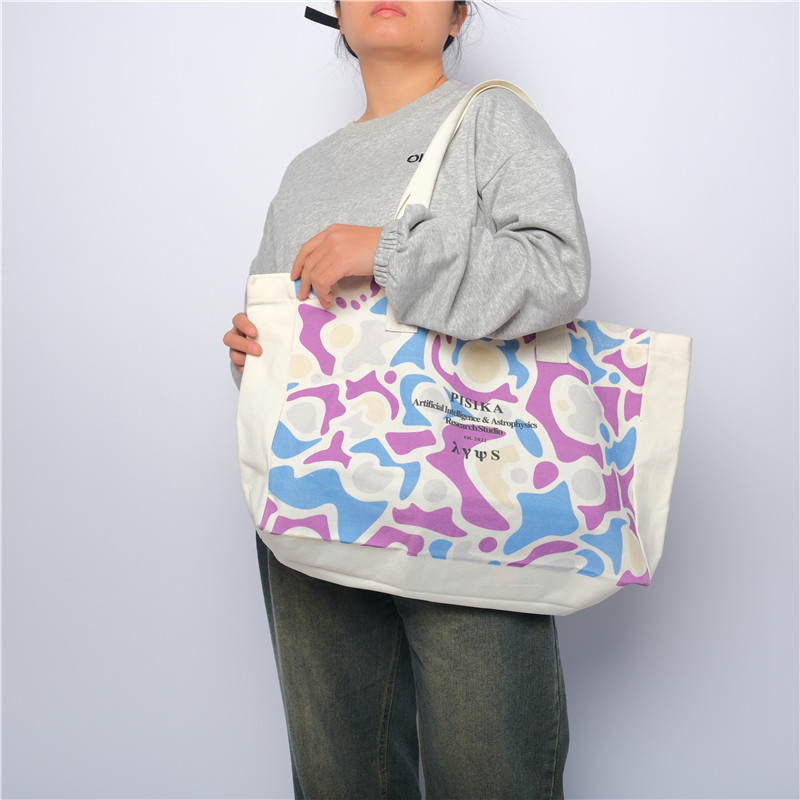
A real shopping bag photographed for LUCKYSTAR’s product range. Its multicolour artwork illustrates the type of design buyers often evaluate for a short-run digital route; the photo alone is not evidence of the exact production method.
1. Make the comparison on one locked bag specification
A fair quotation uses the same finished bag size, material, colour, construction, print position, artwork dimensions, number of designs, quantity per design, packaging and delivery requirement. If the digital quotation uses a thin stock bag while the screen quotation uses a custom heavy canvas bag, the price difference says little about printing.
Separate the bag MOQ from the print MOQ. A decorator may accept 25 digital transfers, but a custom-dyed fabric, laminated non-woven roll, branded handle or sewn construction may still require hundreds or thousands of pieces. Conversely, a ready-stock natural cotton tote can sometimes carry a one-colour screen print at a genuinely small quantity. Ask which component creates the minimum.
Lock these inputs before choosing a route: substrate composition and colour; finished size; print area; artwork count; front/back printing; spot or process colour; required opacity; hand feel; wash/rub exposure; compliance destination; sample type; tolerance; reorder plan and launch date.
| Decision signal | Digital route may lead when… | Screen route may lead when… | Evidence to request |
|---|---|---|---|
| Artwork | Photographs, gradients, fine multicolour illustration or frequent changes dominate | One to three bold spot colours and stable shapes dominate | Production sample on the specified bag surface |
| SKU split | The total is divided among many artworks, names or campaign versions | Most units share one design and colourway | Setup and run cost by artwork, side and colour |
| Quantity | Setup-light production protects a very short run | A simple screen job remains efficient or the repeat volume dilutes setup | Price ladder using identical specifications |
| Opacity | The digital system has a qualified white/underbase or transfer route | A controlled spot-colour deposit is required on a dark or textured surface | White-base method, print sequence and cured sample |
| Surface | The selected ink/transfer is qualified for the material and coating | Ink, mesh and treatment are proven on the material | Adhesion, rub, flex and heat evidence |
| Reorder model | Small, frequent or personalised replenishment is expected | The same approved design will repeat in meaningful batches | Stored file/screen policy and repeat-colour control |
2. “Digital printing” is not one process
Buyers often request “digital printing” without defining how the image will reach the bag. That creates avoidable surprises in hand feel, colour, durability and unit cost. For cotton and cotton-rich bags, a supplier may propose direct-to-garment (DTG), in which ink is jetted onto the textile and then cured. Epson’s description of purpose-built DTG technology explicitly includes tote bags among printable items and distinguishes colour-only and white-ink configurations.
Another short-run route is direct-to-film (DTF): artwork is printed to transfer film, receives adhesive powder, is heated, then transferred to the textile under heat and pressure. Mimaki’s DTF process description identifies CMYK plus white pigment ink and the film, powder, drying and heat-transfer sequence. DTF may support detailed colour on several textile colours, but the transfer creates a defined film-like area whose hand and edge must be approved.
Polyester may suit dye-sublimation when the material, colour and coating route are compatible. Flatbed UV inkjet or UV-DTF may be proposed for certain coated, synthetic or hard-to-print surfaces, but adhesion and flex testing are essential. Paper bags may use digital toner or inkjet on sheets, often followed by die cutting and conversion. These routes should not be treated as interchangeable.
| Short-run digital route | Common fit | Strength | Approval risk |
|---|---|---|---|
| DTG inkjet | Qualified cotton or cotton-rich flat textile panels/bags | Detailed full colour with no separate screen per colour | Pretreatment, white ink, fabric absorption, cure and rub/wash behaviour |
| DTF heat transfer | Many textile shopping bags when temperature and pressure are suitable | Fine colour, white base and small artwork batches | Transfer hand, edge, stretch/flex, heat marks and peel resistance |
| Dye sublimation | Suitable light-coloured polyester systems | Colour becomes part of the receptive surface with soft hand | Material composition, coating, migration and colour expectation |
| Flatbed UV / UV transfer | Selected coated synthetics, promotional constructions or rigid components | Digital detail and possible white/varnish effects | Adhesion, cracking at folds, surface treatment and end-use compliance |
| Digital paper printing | Short-run sheet-fed paper bags and prototypes | Fast artwork changes and process colour | Sheet size, colour condition, fold cracking, finish and conversion minimum |
3. What screen printing changes in the workflow
Screen printing pushes ink through open areas of a stencil carried by mesh. Each spot colour normally needs its own separated artwork, screen, ink setup and print pass. The printed result depends on stencil profile, mesh specification, ink rheology, squeegee, off-contact, pressure, flash/dry/cure and the bag surface.
PRINTING United Alliance guidance on screen making explains that mesh, emulsion/stencil, ink and artwork feature size must work together, and that mesh also influences the deposited ink film. That is why a screen printer should not promise every tiny line, halftone or heavy solid from a generic file without preflight.
Screen printing is not restricted to large orders. A one-colour logo on an available cotton tote may need only one screen and one print pass, so it can be practical at a modest quantity. However, four spot colours can require four screens, four registrations and multiple curing stages. The job becomes setup-heavy even if the total quantity remains small.
4. Low MOQ economics depend on setup per sellable design
Do not compare only the printed unit price. Use a landed programme calculation:
Total programme cost = bag cost + artwork/prepress + screens or digital setup + printing/transfer + sampling + expected spoilage + packing + freight + duty/tax where applicable.
Then divide by accepted, saleable units—not ordered units. If 300 bags are split into three designs of 100, screen setup may repeat three times. A digital route may keep setup comparatively light, although RIP/preflight, white ink, pretreatment, transfer cutting/handling or minimum sheet/film nesting still have costs. If all 300 use one one-colour logo, screen printing may remain competitive.
Ask for a price ladder at realistic quantities and SKU splits: for example 100, 300, 500 and 1,000 pieces, with one design and with five designs. The “crossover quantity” is project-specific. It moves when print area, colour count, material, sides, coverage, cure time, rejection rate and packaging change.
| Cost element | Digital behaviour | Screen behaviour | Quotation line to isolate |
|---|---|---|---|
| Artwork setup | File preflight, RIP/colour setup and possible white layer | Separation, film/imaging and one stencil/screen per colour | Charge per artwork, size, side and colourway |
| Variable designs | Often efficient when files can change without physical screens | Each design or colour separation can trigger new screens/setup | Number of files included and changeover charge |
| White base | May add white ink passes or transfer layers | May add an underbase screen/pass | White included or charged separately |
| Run cost | Ink/film/powder/pretreatment plus machine and handling time | Ink, print passes, flash/cure and operator time | Variable price per accepted piece |
| Spoilage | Calibration, head/nozzle, transfer and placement failures | Registration, ink, screen, smudge and cure failures | Planned overage and defect allowance |
| Reorder | File can be recalled, but material/ink settings still need control | Screens may be reclaimed or stored; colour and setup must be recreated | Tool/file storage period and repeat-order assumptions |
5. Match artwork complexity to the process
Digital normally handles continuous-tone images, small colour transitions and many colours without converting each colour into a physical screen. That makes it useful for licensed art, artist collaborations, event graphics, test-market collections and personalised campaigns. However, the final result still depends on resolution, colour space, underbase, surface texture and the size at which the image is printed.
Screen printing rewards disciplined spot-colour artwork. Large logos, bold typography and limited palettes can look deliberate and saturated. Halftones and simulated process work are possible, but they require a printer with the relevant mesh, separation, registration and process-control capability. “Screen printing supports only simple graphics” is too broad; the better question is whether its added setup is justified for this low-MOQ programme.
Prepare final-size vector paths for logos and type wherever possible. Supply high-resolution raster images at final print dimensions. Do not hide transparency, overprint or white elements. Keep bag seams, handles, gussets, creases and pockets out of the image unless the printer has approved a jig or panel-printing route. The shopping bag artwork and dieline guide explains placement zones and production layers.
| Artwork feature | Digital preflight | Screen preflight | Approval question |
|---|---|---|---|
| Photograph | Resolution, profile, tonal range, black generation and substrate colour | Separation method, halftone, mesh and registration capability | Does the production proof preserve critical detail and skin/product colour? |
| Gradient | Banding, light tones, white-base interaction and RIP settings | Minimum stable dot, screen angle, mesh and fade endpoint | Where does the physical gradient end on this material? |
| Spot logo | How will CMYK/expanded colour simulate the target? | Which mixed ink, mesh and deposit will reproduce it? | Is a visual or measured tolerance required? |
| Small reverse type | Ink spread, underbase choke and surface texture | Stencil, mesh, ink deposit and fill-in risk | What minimum line/type rule applies to the actual process? |
| Full coverage | Ink/transfer area, hand, cost and cure/press consistency | Ink deposit, screen marks, drying and bag flatness | Should the art be reduced, panel-printed or changed to another route? |
| Multiple versions | File naming, variable data, batching and proof matrix | Separate screens, colour changes and wash-up sequence | How will each version remain traceable through packing? |
6. Choose by material before choosing by artwork
The same logo can require a different route on cotton canvas, polyester, non-woven polypropylene, laminated woven PP and paper. Surface energy, texture, absorbency, coating, heat sensitivity and sewing/conversion stage determine what is possible. Compare the available shopping bag constructions, and ask whether printing occurs on a flat panel, finished bag, roll or transfer.
Cotton and canvas: DTG may provide soft, detailed colour on a qualified fabric after appropriate pretreatment and cure. DTF can add colour and white to more fabric colours but creates a transfer hand. Screen printing is proven for strong spot artwork and can deposit opaque ink, although texture influences fine detail.
Polyester and RPET: sublimation may suit a receptive light-coloured polyester; transfers or qualified screen inks may suit other constructions. Test dye migration, heat marks and dimensional change. An RPET claim does not tell the printer how the surface will behave.
Non-woven and woven PP: surface treatment, lamination and ink compatibility are decisive. A route that adheres to one treated PP may fail on another. For structural differences, review woven PP vs non-woven PP shopping bags and the laminated vs unlaminated non-woven guide.
Paper: low-volume digital sheet printing can serve prototypes and short retail runs, while screen printing is a specialist choice for particular spot effects. Larger paper programmes often move toward flexographic or offset routes; compare those in Flexographic vs Offset Printing for Paper Shopping Bags.
| Bag material | Digital routes to investigate | Screen route questions | Must-test risk |
|---|---|---|---|
| Natural cotton / canvas | DTG or DTF according to colour, finish and bag geometry | Ink system, mesh, texture bridging, cure and print-before/after sewing | Rub, wash if relevant, crocking, hand and shrinkage |
| Dark cotton / canvas | White-enabled DTG or DTF transfer | Underbase, flash, colour layer and cure | Opacity, halo, cracking and colour contamination |
| Polyester / RPET | Sublimation on qualified light material; DTF/other transfer where qualified | Low-bleed/migration strategy and heat exposure | Migration, scorch/gloss, dimensional stability and adhesion |
| Non-woven PP | Qualified direct/transfer route for the exact treated surface | Surface treatment, ink bond, cure temperature and film weight | Tape/adhesion, rub, crease/flex and blocking |
| Laminated woven PP | Qualified surface digital/transfer or printed-film conversion route | Ink-to-laminate compatibility and scratch resistance | Adhesion, abrasion, fold and laminate bond |
| Paper | Sheet toner/inkjet matched to paper and finishing | Special spot effect, ink, drying and flat-sheet handling | Fold cracking, rub, set-off, finish and glue compatibility |
7. Dark bags make white ink and underbase control visible
A dark substrate absorbs or alters transparent colour. Digital production may print a white underbase before colour, or use a transfer built with white. Screen printing may use a separate white underbase screen, sometimes with a flash stage before colour. Both can create opacity; both can also create edge halos, excessive thickness, poor flex or an unintended hand if registration and deposit are not controlled.
Require the artwork proof to show which areas receive white. Approve choke/spread at small edges, especially around fine type. Compare the bag under the intended lighting, then bend and flex the printed area. A dense white that looks excellent while flat may reveal cracks or a heavy patch during use.
8. Compare hand feel, edge and durability—not just colour
DTG can feel relatively integrated on suitable light fabric, although white layers and pretreatment may change the hand. DTF generally creates a discrete transferred image whose thickness depends on the system and coverage. Screen printing can range from a soft controlled deposit to a deliberately heavy, tactile layer. Sublimation can be very soft because the colour is carried into a receptive polyester surface.
Durability is application-specific. A fashion tote may need repeated flex and occasional washing; a grocery bag may face abrasion, damp products and handle stress; a promotional giveaway may need colour stability during a shorter campaign. Agree the relevant test instead of using an undefined phrase such as “washable” or “long-lasting.”
Inspect after the approved curing interval. Perform dry and wet rub where relevant, tape/adhesion on non-absorbent surfaces, bend/flex at expected folds, wash only if the care claim requires it, and heat/cold exposure when transport or use makes it relevant. The reusable shopping bag testing guide helps translate end use into a test plan.
9. Colour approval must match the production route
A screen-mixed spot colour and a CMYK digital simulation are not equivalent targets. Screen printing may use a physically mixed spot ink, while digital often builds the appearance from its ink set and profile. On natural canvas, the fabric becomes part of the colour. On a dark bag, the white layer changes saturation and edge appearance.
Create an approval hierarchy: reference colour or artwork; substrate-specific proof; production-process sample; converted/final bag; bulk first-off. A monitor proof can approve content and layout but cannot predict fabric texture, white opacity, transfer hand or cured ink. For measurement, record illuminant/observer, backing, instrument geometry and tolerance; for visual approval, record lighting and the signed physical master. The shopping bag colour-matching workflow explains these gates in detail.
10. Order a sample that answers the real risk
A digital mock-up printed on another textile proves very little about the chosen bag. A screen strike-off on a flat swatch may not show seam, pocket or handle interference. Tell the supplier what the sample must validate: colour, artwork detail, opacity, hand, edge, placement, cure, print-to-seam clearance, bag construction, pack-out or all of them.
For a low-MOQ launch, a production-process sample can be proportionally expensive, but it may prevent the whole order from becoming unsellable. If the supplier offers only a colour simulation before bulk, document what remains unproven and use a controlled bulk first-off hold.
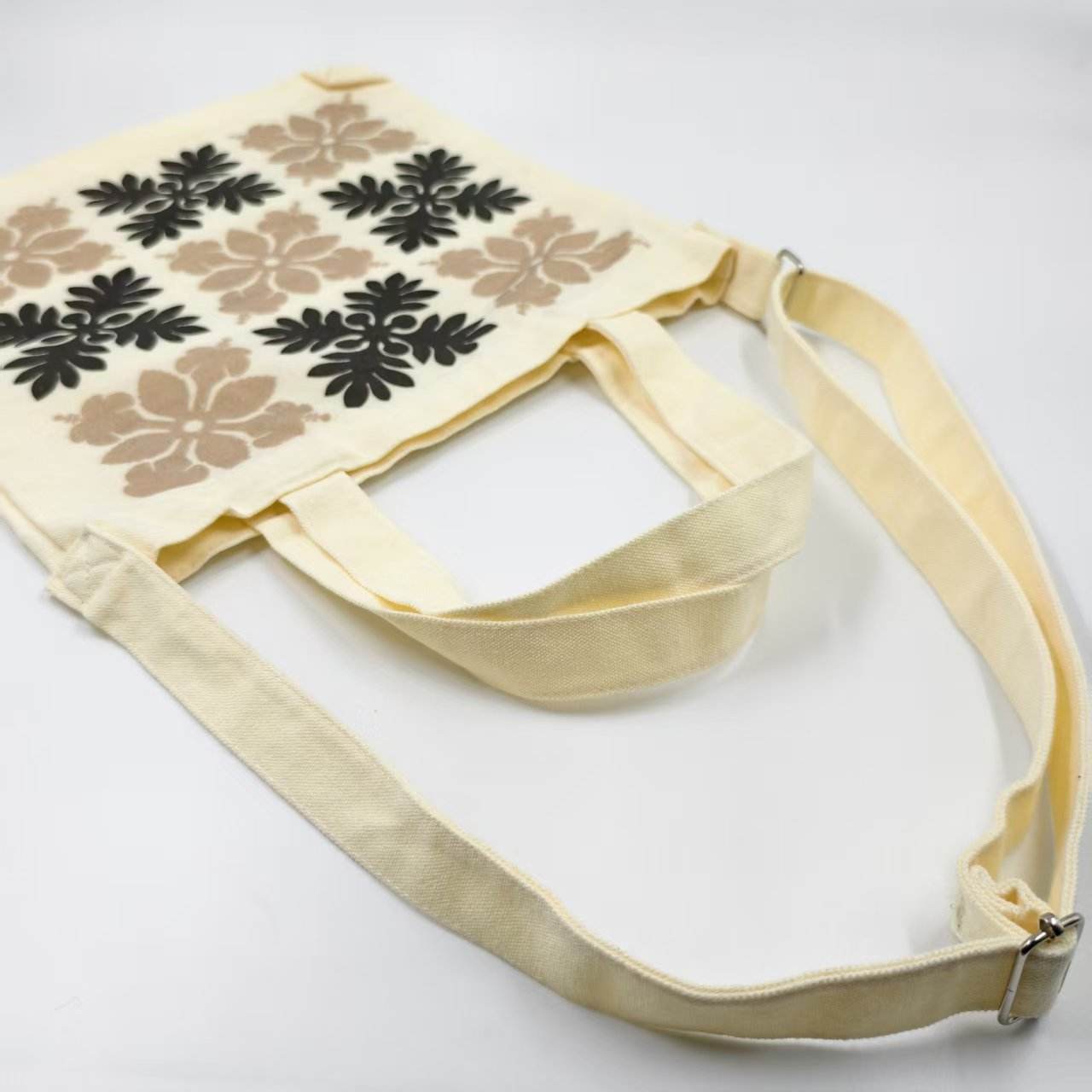
A real LUCKYSTAR fabric shopping bag with a restrained floral repeat. It provides a practical reference for evaluating limited-colour artwork on the intended textile surface; the final production method must still be confirmed in the production record.
11. Build quality control around each route’s failure modes
Inspection should separate print defects from bag defects. A centred, durable print cannot rescue weak handle stitching; a strong bag cannot rescue peeling artwork. Trace the printed pieces to artwork version, material lot, route, settings, operator/date and packing carton.
| Control point | Digital checks | Screen checks | Release record |
|---|---|---|---|
| Incoming blank/panel | Material, colour, moisture/flatness, treatment and printable area | Material, colour, surface treatment, seams and platen fit | Approved lot and sample |
| Artwork/version | RIP file, profile, white layer, scale and variable-data map | Separations, screen IDs, ink formula, scale and register marks | Version-controlled production PDF |
| First-off appearance | Nozzle/banding, detail, colour, white, edge and placement | Stencil/mesh result, ink deposit, colour, register and placement | Signed first-off with settings |
| Cure/transfer | Pretreatment, temperature/time/pressure, film release and dwell | Flash/dry/cure temperature/time and ink condition | Time-temperature or process log |
| Performance | Rub, adhesion/peel, flex and wash/heat where relevant | Rub, adhesion, flex and cure verification where relevant | Test method, sample size and acceptance |
| In-process drift | Nozzle health, banding, colour, white, transfer placement and contamination | Ink viscosity/condition, screen blockage, register, deposit and cure | Checks by time or piece interval |
| Finished bag | Artwork orientation, seam clearance, hand, marks and bag function | Artwork orientation, register, smudge, cure and bag function | AQL/inspection report and retained master |
Use the print-and-construction QC workflow to connect print release with dimensions, gussets, handles, reinforcement, load testing and packaging.
12. Digital is strongest when artwork variability has value
Low MOQ is not only about testing demand. It can support city editions, influencer names, event dates, store openings, numbered gifts, seasonal art and regional languages. Digital files can change without making a new physical screen for every version, but the production system still needs control.
Create a data table with one row per version: filename, visible text, quantity, bag colour, print side, size and carton allocation. Lock spelling and character support. Generate a proof matrix, not one sample that stands for every variant. If personal data is involved, define who supplies it, how it is validated, how misprints are handled and when files are deleted.
Screen printing remains useful for a shared base logo combined with a smaller digital variable element. A hybrid route can be economical when most artwork is constant and only a name or campaign detail changes. Ask whether the two layers can be registered, cured and tested without damaging each other.
13. Avoid the common low-MOQ traps
Trap 1: confusing a stock-bag print MOQ with a custom-bag MOQ. A low decoration quantity does not guarantee custom fabric, size or handle minimums. Trap 2: accepting “digital” without the exact route. DTG, DTF and sublimation do not produce the same hand or material compatibility. Trap 3: comparing one digital artwork with four screen colours but ignoring a one-colour screen option. Simplifying art can change the commercial answer.
Trap 4: approving colour only on screen. Bag colour and texture change print. Trap 5: quoting total quantity without the per-design split. Setup follows sellable designs. Trap 6: skipping cure and adhesion tests to save sample time. A fast low-MOQ run can still peel, crack or rub. Trap 7: assuming reorders will match automatically. Record material lot, route, file, colour target and settings.
The shopping bag MOQ and production-time guide helps identify the component that sets the minimum. For full landed-cost planning, use How Much Do Custom Shopping Bags Cost?
14. Sustainability claims need route-specific evidence
Digital can reduce physical screens and may suit on-demand production, which can limit obsolete inventory. That does not make every digital route environmentally preferable. Pretreatment, white ink, film, powder, release liner, cleaning, energy, failed transfers and equipment utilisation all matter. Screen printing uses screens, stencil chemistry, wash-up and ink, but an efficient repeat run may have low waste per accepted bag.
Assess the complete product: fibre or polymer source, recycled content, bag durability, print coverage, ink/transfer chemistry, cure energy, reject rate, packaging and end-of-life constraints. A large transfer film can affect the feel and recovery route of a textile; heavy ink or mixed materials can also complicate claims. Ask for evidence supporting any chemical, recycled-content or certification statement and keep claims specific to the supplied product.
Company-claim boundary: LUCKYSTAR statements in this section are publisher self-description, not third-party verification, printer authorization, laboratory evidence or assurance of a particular MOQ, price, colour, durability, environmental result, compliance status or delivery date. Confirm the contracting entity, assigned bag and decoration sites, subcontracting, material and construction, route and equipment, ink/transfer system, sample and test method, inspection, packing and commercial release terms for the order.
15. How LUCKYSTAR describes its low-MOQ print-route review
LUCKYSTAR states that its project team can compare available digital and screen-printing routes around one locked shopping-bag specification, subject to specification and written confirmation. The purpose is to expose the assumptions behind each quotation rather than select a process from the order quantity alone.
- Separate minimums: identify the minimum for the bag body, material/colour, decoration process, each artwork or SKU, packing and assigned production route.
- Name the digital route: record whether the proposal uses DTG, DTF, sublimation, flatbed inkjet or another defined workflow, including pretreatment, white layer, transfer and cure/press conditions.
- Normalize the comparison: hold bag composition, weight/thickness, colour, size, construction, print dimensions/sides, artwork split, opacity, hand, pack-out and delivery basis constant.
- Approve physical evidence: define screen proof limitations, route-specific strike-off or transfer, finished-bag sample, retained reference and first-off release.
- Test the real risks: agree rub, adhesion, flex, wash or heat exposure where relevant, plus colour, placement, edge, cracking, migration, construction and pack-out checks.
- Compare programme cost: separate screens or digital setup, bag body, decoration, samples, spoilage, version control, storage, remakes and reorder assumptions without assuming a universal crossover quantity.
Review the public custom shopping bag range, the shopping bag print-route overview and the supplier-selection checklist. Then send one finished specification and quantity-by-design matrix for a comparable proposal.
16. Send an RFQ that allows a real digital-versus-screen comparison
| RFQ field | What to provide | Why it changes the decision |
|---|---|---|
| Bag specification | Material composition, weight/thickness, colour, size, gusset, handle and construction | Defines print compatibility, platen/heat limits and base MOQ |
| Artwork package | Vector/raster files, final dimensions, colour references, white layer and versions | Determines digital RIP or screen separations and setup |
| Quantity matrix | Total plus quantity by design, bag colour, size, side and destination | Reveals setup per sellable SKU |
| Performance use | Retail, grocery, event, gift, wash expectation, moisture and abrasion exposure | Sets ink/transfer route and test plan |
| Appearance | Opacity, hand feel, gloss/matte, edge, colour tolerance and placement tolerance | Prevents approval based only on a JPEG |
| Sample gate | Mock-up, substrate strike-off, production-process sample or finished sample | Aligns sample cost with the risk it must answer |
| Reorder forecast | Expected frequency, volume, artwork changes and target continuity | Can shift the choice from lowest first run to lowest programme cost |
| Commercial terms | Tool ownership, file/screen storage, over/under tolerance, packing, Incoterm and date | Makes quotations comparable and protects later reorders |
17. Three illustrative decision scenarios
These quantities and route choices are teaching examples only. They are not LUCKYSTAR MOQ, price or production commitments; the actual result depends on the written order specification and assigned production route.
Artist launch: 120 natural cotton bags, four artworks, full-colour gradients. Digital is the logical first route to sample because each artwork is small and colour-rich. Compare DTG and DTF hand, edge and cure on the actual canvas. Screen printing may become relevant if one design wins and grows into a larger repeat run.
Store opening: 300 black canvas bags, one white logo. Screen printing may remain economical despite the low quantity because there is one screen, one stable design and a strong opacity requirement. Compare it with white-enabled digital only after checking hand, print area and cure. “Low MOQ” alone does not select digital.
Regional campaign: 600 polyester bags, twelve city names plus one common full-colour mark. A digital or hybrid route may reduce repeated screen setup. Validate heat sensitivity, migration and version packing. If the common mark dominates coverage, test a shared screen base plus a smaller variable digital element.
Frequently asked questions
Is digital printing always cheaper for low MOQ shopping bags?
No. It often reduces physical setup for multicolour or multiple-artwork orders, but a one-colour screen print on a ready stock bag can remain competitive at a modest quantity. Compare the same bag, artwork size, sides, SKU split and acceptance standard.
What quantity is the crossover from digital to screen printing?
There is no universal crossover. It depends on screen colour count, digital route, print area, bag material, number of designs, white base, cure time, spoilage and repeat plan. Request price ladders for the exact programme.
Which process is better for photographs and gradients?
A qualified digital route is usually the first option for short-run photographs and continuous colour. Screen-printed halftones are possible, but separation, mesh, registration and setup must be justified by the quantity and required look.
Which process gives stronger spot colours on dark bags?
Screen printing can provide controlled opaque spot-colour deposits. Digital systems with white ink or DTF transfers can also produce strong colour. Approve opacity, edge, hand and flex on the actual dark material.
Is DTF the same as DTG?
No. DTG jets ink directly onto a qualified textile and then cures it. DTF prints a transfer film, adds adhesive powder and transfers the image under heat and pressure. They differ in material range, hand, edge and production controls.
Can the same artwork file be used for digital and screen printing?
The source artwork can be shared, but production files need route-specific preflight. Digital requires resolution, profile, white-layer and RIP decisions. Screen printing requires separations, traps, minimum features, mesh/stencil and registration decisions.
Can digital printing personalise every shopping bag?
Many digital workflows can vary names or artwork without physical screens, but data preparation, proofing, placement, traceability and pack-out must be controlled. Confirm the supplier’s actual variable-data workflow.
Which print lasts longer?
Neither process wins automatically. Longevity depends on material, ink or transfer system, pretreatment, deposit, cure, end use and care. Approve route-specific rub, adhesion, flex and wash tests where applicable.
Should a low-MOQ sample use the intended production method?
Yes when it must validate colour, hand, opacity, edge or durability. A substitute mock-up can confirm size and layout only if its limitations are written and bulk begins with a controlled first-off approval.
Can LUCKYSTAR quote both digital and screen options?
Where the selected bag, artwork and supplier route support both, LUCKYSTAR can compare the practical workflows. Send material, quantity by design, print size, bag colour, files, performance needs and reorder forecast so the quotation is meaningful.
Conclusion
The best route for low MOQ shopping bags is the one that protects the approved design and total programme economics. Digital printing is powerful for colour complexity, small SKU batches, frequent artwork changes and personalisation. Screen printing remains powerful for limited spot palettes, opacity, tactile deposits and stable repeat designs. Material compatibility comes first.
Review the broader shopping bag print-route overview when comparing other processes. For supplier qualification, return to the Shopping Bags cluster pillar. For group-wide due diligence, use the main sourcing reference.

Send LUCKYSTAR your bag specification, artwork files and quantity by design for a route-specific quotation.
Request a comparable low-MOQ print proposal
Use one finished bag specification and quantity-by-design matrix so digital and screen routes return comparable assumptions.
Review LUCKYSTAR custom shopping bag options, then send your project details through the contact form or Email a project brief. The email link opens a draft for your review before sending.
Bag and decoration-site assignment, material, ink/transfer system, equipment, tooling, sample, colour, performance, claims, inspection, price, MOQ, packing, schedule and release terms are subject to due diligence, specification and written confirmation.